Written by Segment SEO’s strategy team, specialists in SEO and AI visibility for B2B SaaS, technology, and enterprise software companies.
Most SEO platforms estimate what is happening in Google. Google’s own tools show you the data Google is willing to share directly: which queries trigger your pages, which URLs are indexed, how users behave after they click, and where technical issues may be holding pages back.
That does not mean third-party tools are useless. They are valuable for competitor research, keyword expansion, rank tracking, and reporting at scale. But if you are trying to understand how Google sees your own website, tools like Search Console, GA4, PageSpeed Insights, Keyword Planner, Trends, Autocomplete, and Business Profile should be the foundation.
For B2B SaaS and technology companies, these tools are especially important because SEO decisions need to connect technical performance, search visibility, and measurable pipeline outcomes.
At Segment SEO, we usually see the best results when companies stop treating these tools as occasional troubleshooting dashboards. Reviewing Search Console, indexing reports, GA4 acquisition data, and Core Web Vitals on a regular schedule makes it easier to spot problems before they become major traffic losses.
To improve search visibility, you need two types of data: pre-click search data and post-click website behavior. Search Console shows how people find you in Google. GA4 shows what they do after they land on your site.
If you only set up one Google SEO tool, make it Google Search Console. It is the closest thing you get to seeing how Google Search views your website.
The Performance report helps you answer practical questions:
Search Console also helps with indexing. You can inspect individual URLs, submit an XML Sitemap and Robots.txt, review indexing issues, and request recrawling after important updates. The data is not instant, so it is better for trend analysis and diagnostics than minute-by-minute monitoring.
Search Console tells you what happened in Google before the click. Google Analytics 4 tells you whether those visitors actually did anything valuable after arriving on your site.
For SEO, GA4 is most useful when it is tied to real business outcomes: demo requests, contact forms, signups, booked calls, trials, or revenue events. You can also use GA4 traffic acquisition reports to separate organic search from referral, direct, paid, and some AI-related traffic sources where tracking data is available. However, AI referral attribution remains incomplete because many AI-originated visits do not pass clear referrer information.
That matters because rankings alone do not prove an SEO program is working. A page can gain impressions without generating qualified pipeline. Pairing GA4 conversion data with Search Console query data makes it easier to prioritize the pages that drive business value, not just traffic. Check out our guide on key SEO Metrics to align reporting with revenue goals.
Google tools become most valuable when they are used together rather than separately. A typical SEO workflow combines Search Console data to identify ranking opportunities, GA4 to measure conversions, PageSpeed Insights to monitor technical performance, and Google Trends to guide content decisions.
At Segment SEO, we use these insights alongside technical audits, content strategy, and AI visibility analysis to create SEO roadmaps tied to business goals.
Search Console and GA4 work best together. Search Console shows the search opportunity. GA4 shows the website outcome. Looker Studio can then combine both data sources into dashboards for leadership, content teams, and technical stakeholders.
Search Console is where you diagnose search visibility. GA4 is where you validate whether that visibility creates business outcomes. Both should be part of any effective SEO reporting workflow, especially for SaaS SEO where traffic quality matters as much as traffic volume.
Search performance depends on more than keywords. Google needs to crawl, render, index, and serve your pages without running into preventable technical barriers. Strong Technical SEO Techniques and Strategies help make that possible.
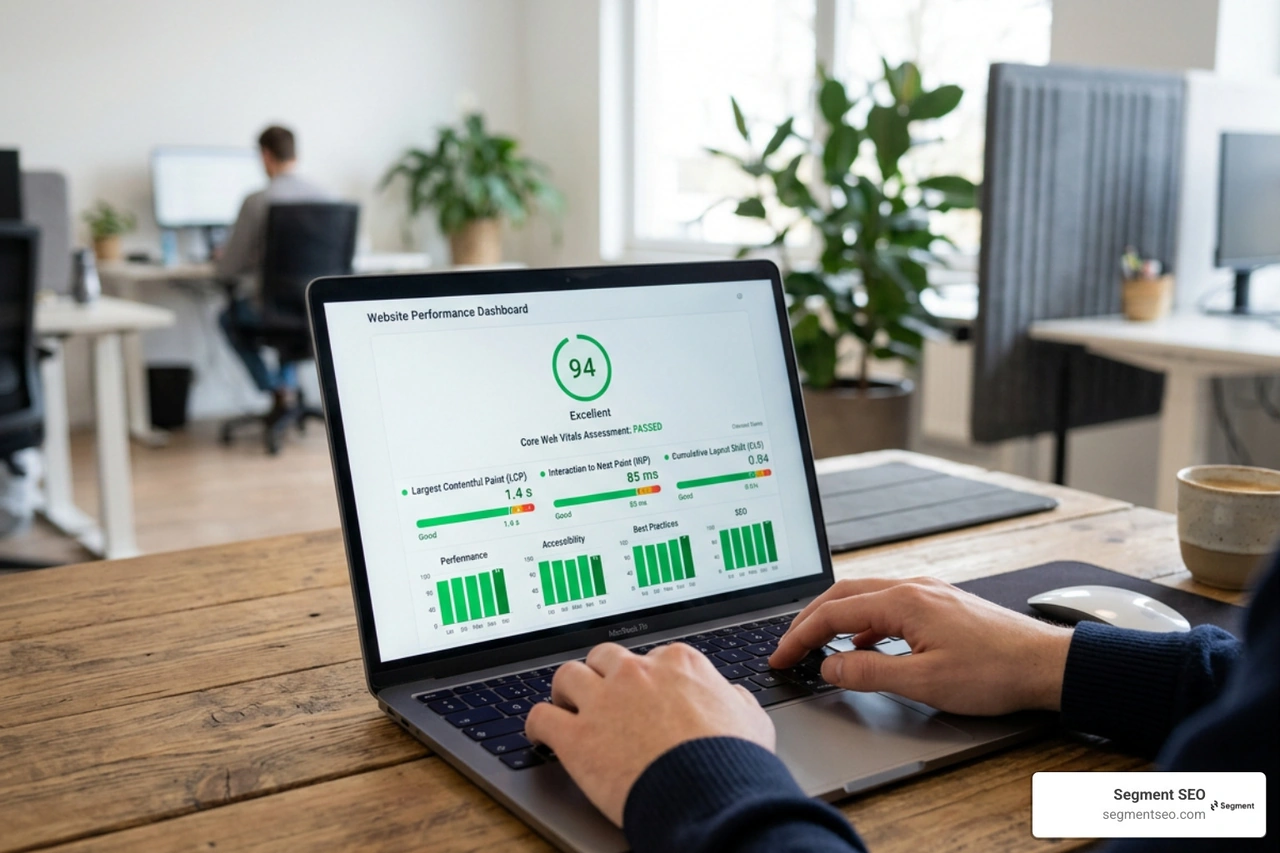
Google PageSpeed Insights helps you understand how fast and stable a page feels for users. It reports Core Web Vitals and gives technical recommendations your development team can act on.
The most useful Core Web Vitals thresholds are:
A practical PageSpeed workflow looks like this:
Page experience can influence organic performance, but speed should not be treated as a standalone shortcut to rankings. The real goal is to remove friction for users and make sure technical performance is not holding otherwise strong pages back.
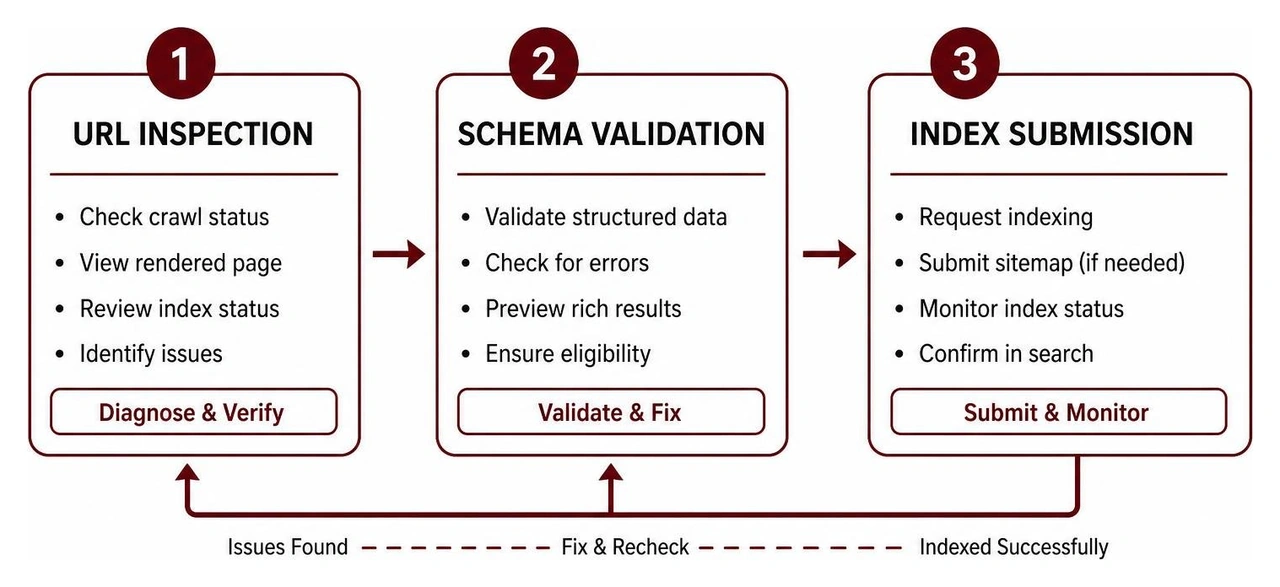
The Search Console URL Inspection tool helps you check whether a specific URL is indexed, when it was last crawled, which canonical Google selected, and whether Google encountered crawl or rendering issues.
The Rich Results Test checks whether structured data is eligible for enhanced search results. It is especially useful before publishing pages with Article, Product, Review, or other schema types. Google has reduced the visibility of FAQ rich results over time, so structured data should be implemented primarily to help search engines understand content rather than as a guaranteed way to earn enhanced listings.
Google’s keyword tools are not perfect, but they are useful for validating demand, seasonality, and search intent before investing in a content plan.
Google Keyword Planner lives inside Google Ads, but SEO teams still use it for directional keyword research. It can show average monthly search volume, competition levels, related keyword ideas, and paid search bid ranges.
The important caveat is that Keyword Planner is not a full SEO strategy tool by itself. It is better for validating demand than deciding what to publish. A high-volume keyword may still be a poor target if the intent is wrong, the SERP is too competitive, or the topic does not connect to pipeline.
A simple SEO workflow for Keyword Planner:
Use Keyword Planner to pressure-test ideas, then combine it with Search Console data, SERP analysis, and business relevance. Discover how to apply these insights in our guide to modern Keyword Research.
Google Trends helps you see whether interest in a topic is rising, falling, seasonal, or region-specific. That makes it useful for editorial planning, product launches, and timing content before demand peaks.
For example, a SaaS company can compare two product-category terms before committing to a landing page, check whether a topic is growing in the United States, and spot seasonal patterns that affect when content should be refreshed.
Google Autocomplete is more informal, but it is still useful. The suggestions can reveal long-tail questions and modifiers that paid tools sometimes miss. Use it as an intent discovery tool, not as the final source of truth.
Some Google tools are built for specific workflows: local visibility, automated reporting, structured testing, and technical monitoring. They become more valuable as your SEO program grows.
For companies with physical locations or local service areas, Google Business Profile is one of the most important tools in the stack. It controls how your business appears across Google Search and Google Maps.
A complete profile can support local discovery by showing accurate business details, reviews, photos, services, hours, and customer actions such as calls or direction requests. For local SEO, this data often matters as much as what is published on the website.
For technical teams scaling reporting environments, the Search Console API provides programmatic access to Search Console data. That can support automated dashboards, anomaly detection, indexing workflows, and recurring SEO health checks.
Advanced teams can also connect Google data sources into internal AI workflows. For example, Search Console, GA4, Tag Manager, and PageSpeed Insights data can help teams prioritize technical fixes, monitor performance changes, and surface indexing alerts faster.
Google’s native SEO tools are essential, but they do not fully measure AI search visibility. Search Console can show performance in Google Search, and GA4 can help identify some referral traffic, but they will not tell you every time your brand is mentioned, cited, or omitted in tools like ChatGPT, Claude, Gemini, or Perplexity.
This gap is especially important for B2B SaaS, fintech, AI, and enterprise software companies, where buyers increasingly use AI assistants to compare vendors, evaluate solutions, and create shortlists before speaking with sales teams.
This is why Segment SEO treats AI visibility as a layer on top of traditional SEO, not a replacement for it. Search Console and GA4 should still anchor the measurement stack. AI SEO and GEO analysis can help show whether that same authority is carrying into answer engines and generative search experiences.
Want to understand how your company appears across AI search platforms? Segment SEO provides AI Visibility Snapshots that identify mentions, citations, competitors, and opportunities across ChatGPT, Gemini, Claude, and other AI experiences.
Get Your Free AI Visibility Snapshot
- Search Console → rankings and indexing
- GA4 → conversions and user behavior
- PageSpeed Insights → Core Web Vitals
- Keyword Planner → keyword demand
- Trends → search trends
- Autocomplete → long-tail questions and modifiers
- Business Profile → local visibility
- Rich Results Test → structured data
- Looker Studio → reporting dashboards
Google Search Console focuses on what happens before the click in Google Search: impressions, clicks, click-through rate, average position, indexing, and crawl-related issues.
Google Analytics 4 focuses on what happens after the click on your website: user behavior, engagement, conversions, traffic source attribution, and funnel performance.
Google Autocomplete is useful for discovering the language people use when they search. It can surface long-tail questions, modifiers, and emerging intent patterns.
Google Keyword Planner can then help validate whether those ideas have meaningful historical search demand. Use Autocomplete for discovery and Keyword Planner for demand validation.
Yes, they can identify many of the issues that matter: indexing problems, sitemap errors, crawl anomalies, Core Web Vitals issues, structured data problems, and some security or manual action concerns.
But they do not fix those issues for you. Search Console and PageSpeed Insights can point your team toward the problem. Developers, SEOs, or content teams still need to implement the fixes.
Not completely. Google’s tools are the best source for first-party Google and website data, but paid SEO software can still help with competitor research, backlink analysis, rank tracking, content gap analysis, and workflow management.
The strongest setup usually combines both: Google tools for source-of-truth diagnostics and third-party platforms for market intelligence and scale.
Google provides nearly everything you need to monitor rankings, indexing, technical performance, keyword demand, local visibility, and user behavior without starting with expensive SEO software. For most businesses, Search Console and GA4 should be the foundation of every SEO strategy. Once those are fully implemented, additional tools can expand the workflow, but they should not replace Google’s own first-party data.
The next step is turning that data into action. Segment SEO helps B2B SaaS, tech, and enterprise software companies translate search, technical, and AI visibility insights into senior-strategist-led execution roadmaps.
Google Search Console shows how you perform in Google. It does not show whether ChatGPT, Claude, Gemini, or Perplexity recommend your brand. Segment SEO helps B2B technology companies measure AI visibility, identify citation gaps, and build a roadmap to improve discovery across search and AI platforms.
If you want a clearer path from diagnostics to pipeline growth, explore our GEO and AI Visibility Services.